Friends, are you still typing out WeChat Official Account drafts word by word?
Now, drop a YouTube video link into n8n, and AI can automatically extract subtitles, refine the text, format it, and even send it directly to your email! Today, I’ll walk you through how to create a fully automated “Video → WeChat Official Account Copy” pipeline using a few simple nodes, easily replicable even for non-technical users.
Core Idea
- Frontend (e.g., Google Sheet) POSTs video link → Webhook
- Pipeline extracts subtitles, cleans text
- LLM rewrites in WeChat Official Account style → Markdown rendering
- Instantly returns results and CCs email, ready for one-click copy to WeChat Official Account backend
Configuration Process
I. GOOGLE APPS SCRIPT CONFIGURATION
Main Function: With Apps Script, you just need to enter a YouTube link into the sheet, and the backend will automatically package and POST the entire row of data to n8n’s Webhook node.
-
Create a new Google Sheet, name it video2text, and set the first column header as url.
-
Create Apps Script
- From the sheet’s top menu, click
Extensions › Apps Script.
- Delete the default
myFunction, then paste the complete code below.
function sendWebhookOnEdit(e) {
  const webhookUrl = ''; // Replace with your webhook node's test URL

  const editedRow = e.range.getRow();
  const sheet = e.source.getSheetByName("video2text");
  const rowData = sheet.getRange(editedRow, 1, 1, sheet.getLastColumn()).getValues()[0];

  const payload = {
    row: editedRow,
    values: rowData
  };

  const options = {
    method: 'post',
    contentType: 'application/json',
    payload: JSON.stringify(payload),
    muteHttpExceptions: true
  };

  try {
    const response = UrlFetchApp.fetch(webhookUrl, options);// Get n8n's returned copy content (plain text mode)
const responseText = response.getContentText();

// Write the returned content to column 2 (you can change this to another column index)
const writeColumn = 2; // Column B
sheet.getRange(editedRow, writeColumn).setValue(responseText);

  } catch (err) {

    Logger.log("Webhook error: " + err.message);

  }

}
function installTrigger() {

  ScriptApp.newTrigger("sendWebhookOnEdit")

    .forSpreadsheet(SpreadsheetApp.getActiveSpreadsheet())

    .onEdit()

    .create();

}
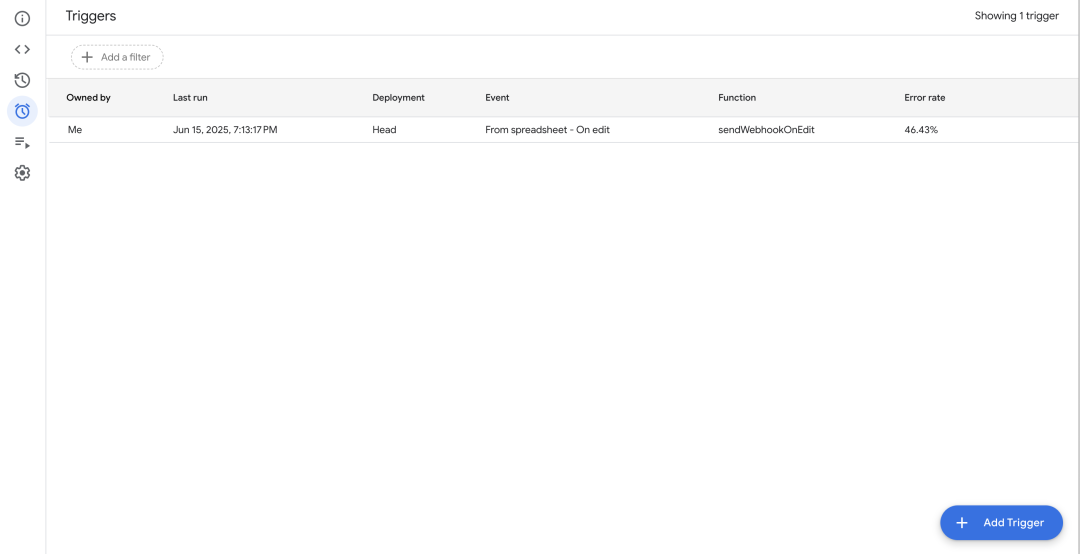
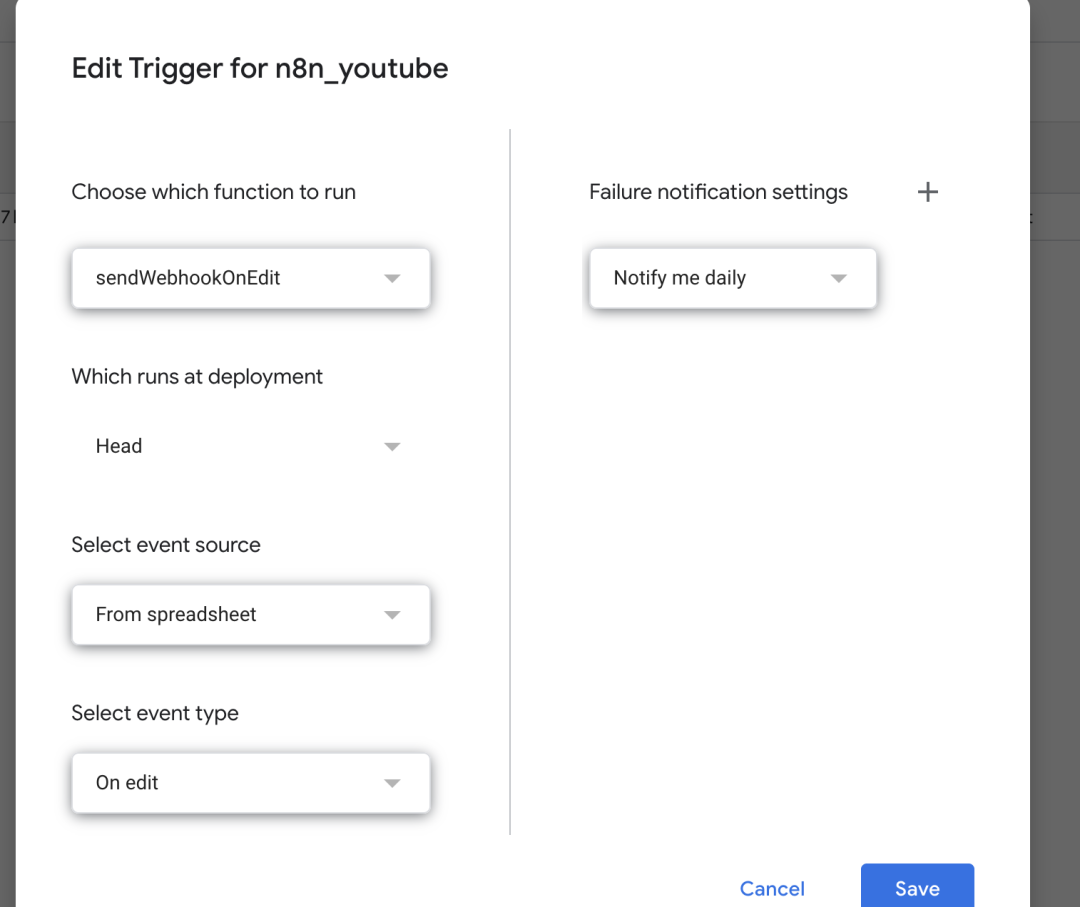
- onEdit Trigger: Add a new Trigger, select
on edit as the event type, then save.
Add trigger
Configure trigger
II. N8N WORKFLOW CREATION
Tip: After configuring each node, click Execute Workflow (Test Execution) to troubleshoot at any time.
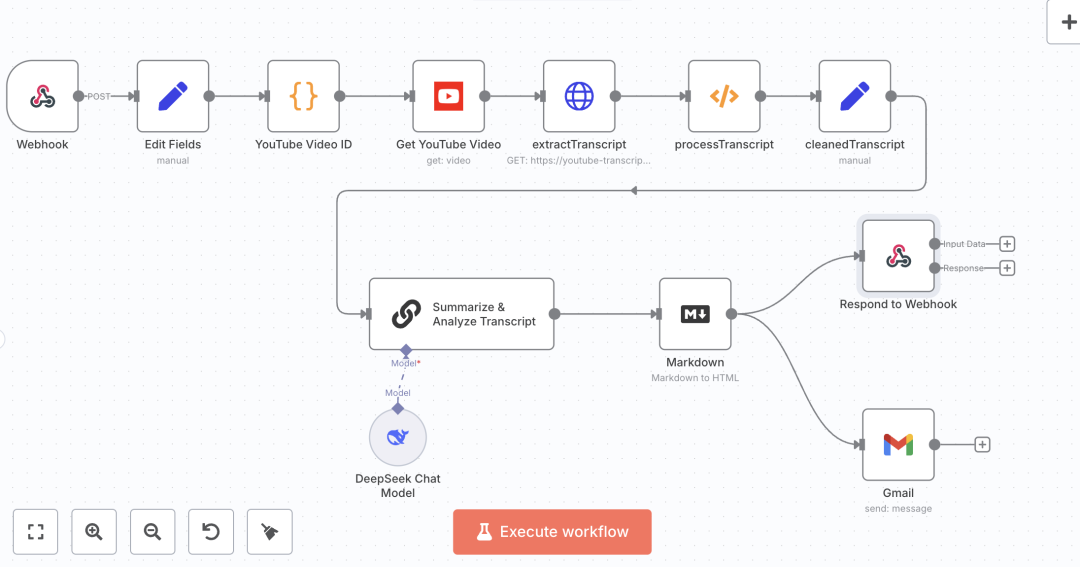
n8n full workflow
-
Webhook Node – Receives external triggers
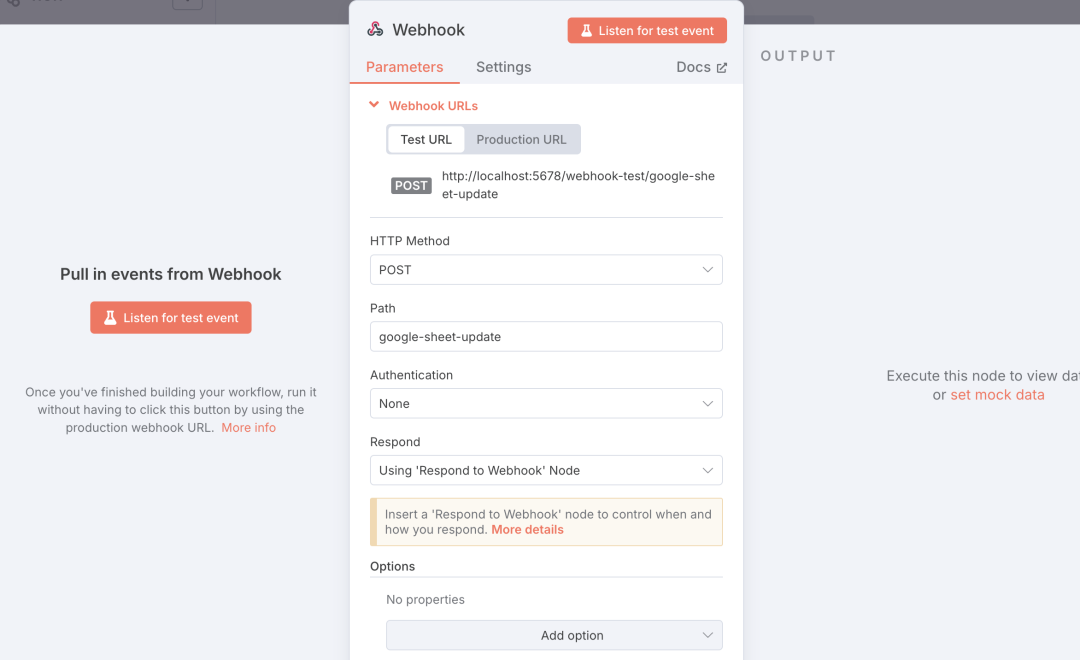
- Create a new Webhook, select
POST as the HTTP method.
- Set the Path address as needed. I’m getting updated data from a Google Sheet, so I set it to “google-sheet-update” to match the functionality.
- Click
Listen for Test Event, paste the URL link into the first column of the Google Sheet, and ensure the webhook receives youtubeUrl.
-
Edit Fields (Set) – Extract link
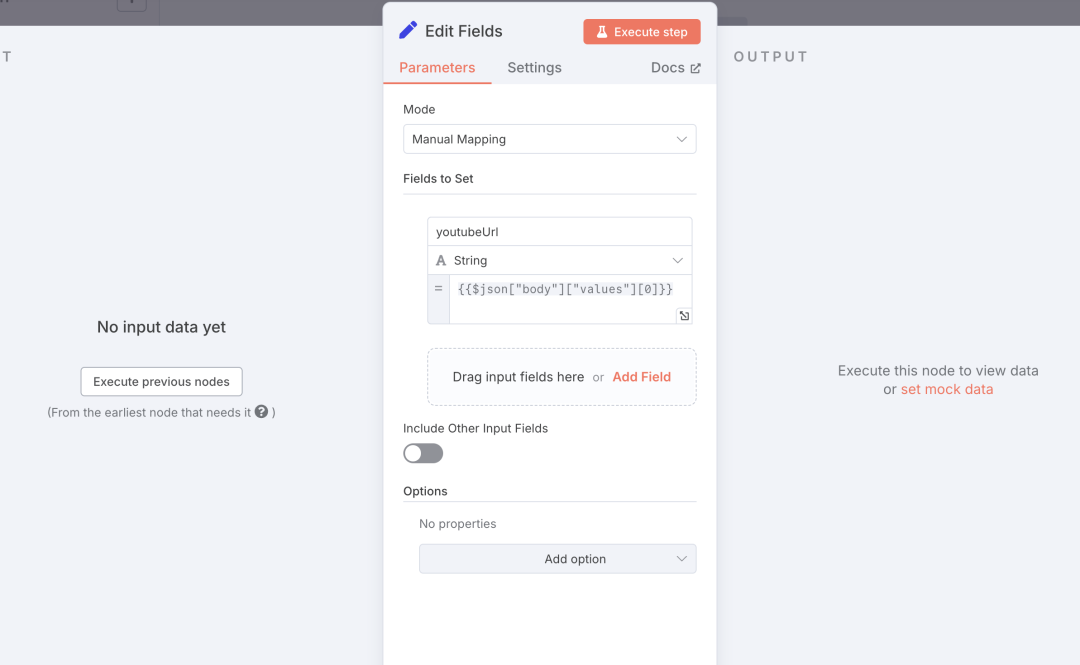
- Add a new field
youtubeUrl.
- Value:
{{$json["body"]["values"][0]}} (the first column of the table contains the video link).
- Test the node’s effect to ensure it successfully retrieves the YouTube video link.
-
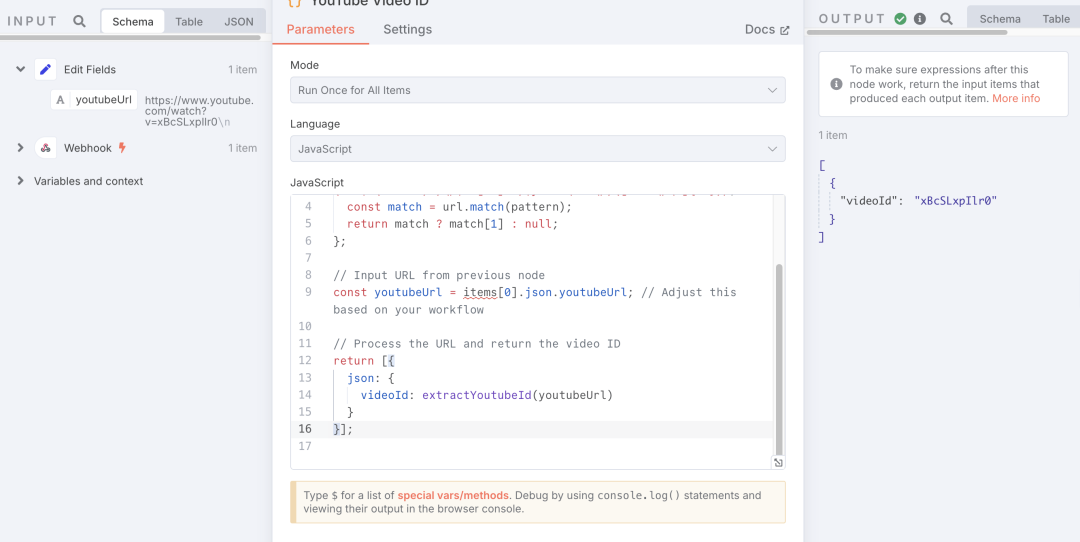
YouTube Video ID (Code) – Extract Video ID
(Image Placeholder)
- Select
Code (JavaScript).
- Paste the following regex script to get the video ID.
const extractYoutubeId = (url) => {
  // Regex pattern that matches both youtu.be and youtube.com URLs
  const pattern = /(?:youtube\.com\/(?:[^\/]+\/.+\/|(?:v|e(?:mbed)?)\/|.*[?&]v=)|youtu\.be\/)([^"&?\/\s]{11})/;
  const match = url.match(pattern);
  return match ? match[1] : null;
};

// Input URL from previous node
const youtubeUrl = items[0].json.youtubeUrl; // Adjust this based on your workflow

// Process the URL and return the video ID
return [{
  json: {
    videoId: extractYoutubeId(youtubeUrl)
  }
}];
-
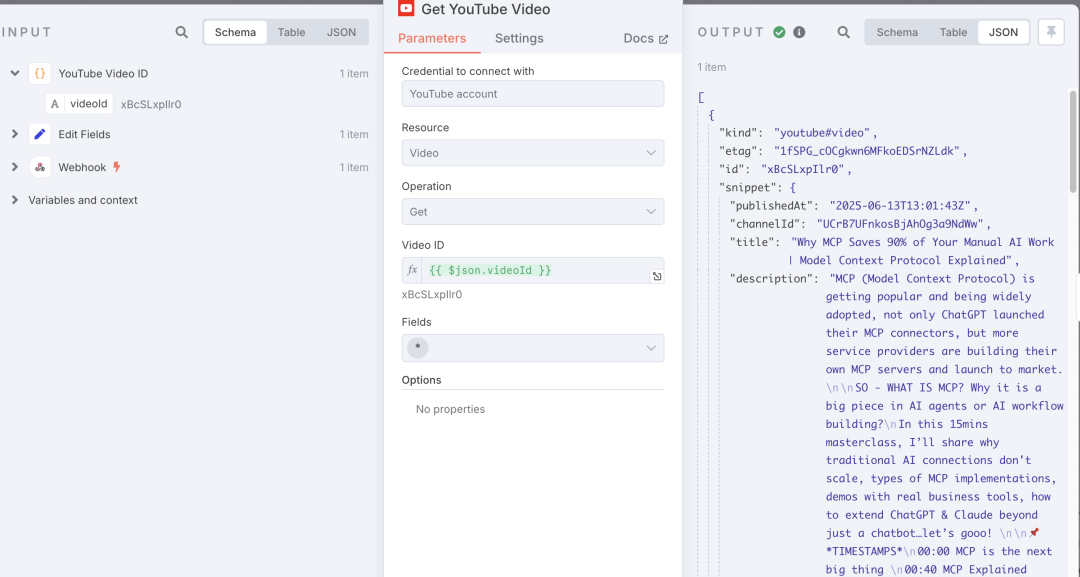
Get YouTube Video – Fetch Video Details
- Node type:
YouTube → Operation: get.
- Use
{{$json.videoId}} for videoId.
- This node requires you to create a project on Google Cloud Platform (console.cloud.google.com), obtain YouTube’s client ID and client secret, and successfully bind OAuth credentials to use it normally (please Google for detailed configuration process).
-
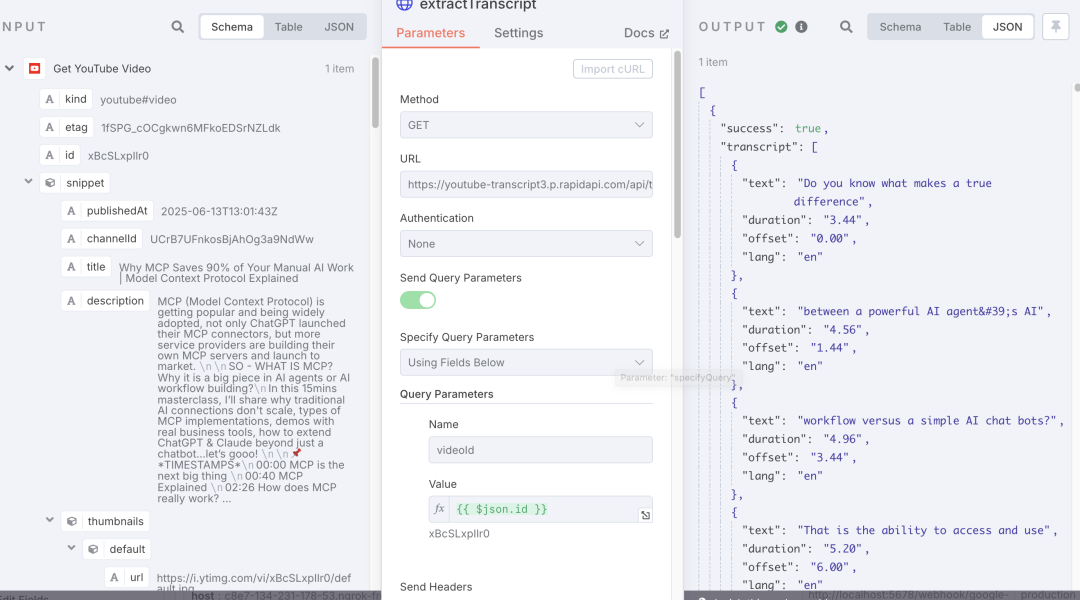
extractTranscript (HTTP Request) – Get Subtitles
- Method:
GET.
- URL:
https://youtube-transcript3.p.rapidapi.com/api/transcript.
- Query parameter:
videoId={{$json.id}}.
- Headers:
x-rapidapi-host: youtube-transcript3.p.rapidapi.comx-rapidapi-key: <Your RapidAPI Key> (you can apply for it on the RapidAPI official website; there’s a free tier available).
-
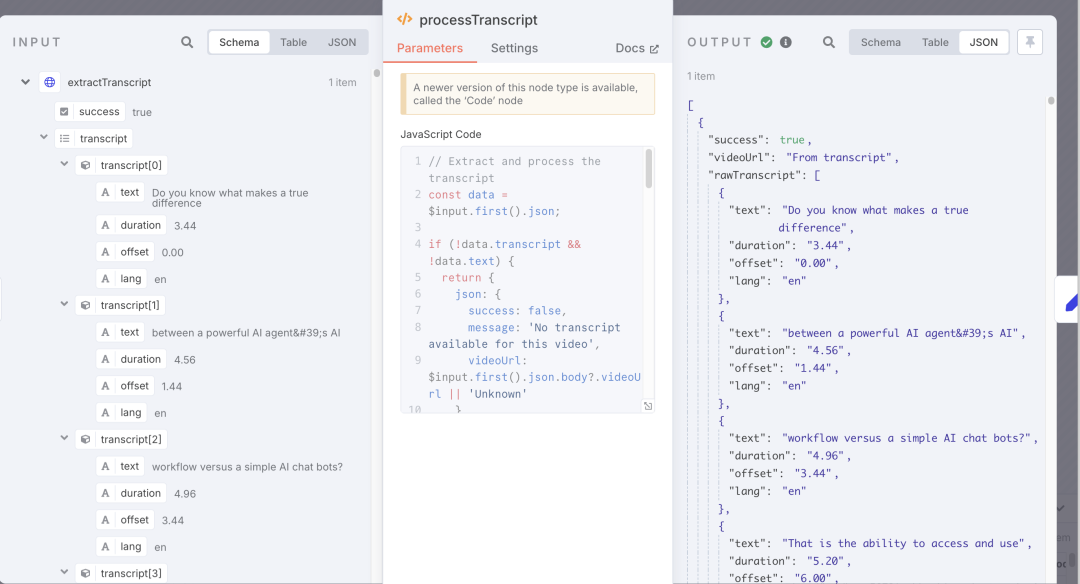
processTranscript (Function) – Clean Text
(Image Placeholder)
Copy the template code. Core logic:
- Array → Plain text
- Remove redundant spaces, punctuation
- Output
cleanedTranscript
// Extract and process the transcript
const data = $input.first().json;

if (!data.transcript && !data.text) {
  return {
    json: {
      success: false,
      message: 'No transcript available for this video',
      videoUrl: $input.first().json.body?.videoUrl || 'Unknown'
    }
  };
}

// Process the transcript text
let transcriptText = '';

// Handle different API response formats
if (data.transcript) {
  // Format for array of transcript segments
  if (Array.isArray(data.transcript)) {
    data.transcript.forEach(segment => {
      if (segment.text) {
        transcriptText += segment.text + ' ';
      }
    });
  } else if (typeof data.transcript === 'string') {
    transcriptText = data.transcript;
  }
} else if (data.text) {
  // Format for single transcript object with text property
  transcriptText = data.text;
}

// Clean up the transcript (remove extra spaces, normalize punctuation)
const cleanedTranscript = transcriptText
  .replace(/\s+/g, ' ')
  .replace(/\s([.,!?])/g, '$1')
  .trim();

return {
  json: {
    success: true,
    videoUrl: $input.first().json.body?.videoUrl || 'From transcript',
    rawTranscript: data.text || data.transcript,
    cleanedTranscript,
    duration: data.duration,
    offset: data.offset,
    language: data.lang
  }
};
-
cleanedTranscript (Set) – Standardize Data
(Image Placeholder)
- Assign the
cleanedTranscript from the previous step to a unified field transcript for easy LLM invocation later.
-
Summarize & Analyze Transcript (LangChain LLM)
-
Node: @n8n/n8n-nodes-langchain.chainLlm
-
Select DeepSeek Chat Model (or your preferred large model).
-
Prompt
Please rewrite the user-provided text content into copy suitable for publication on a WeChat Official Account. The style should be light and easy to understand, with clear logic, conforming to new media reading habits, and output in Markdown format (not as a code block). Copywriting requirements:
- The copy title should grab reader attention, create emotional value, convey clear benefits, or pique curiosity.
- The copy author is ‘Yutou Xiaobao’.
- Start with a question or a story introduction.
- The article structure should be clear, organized, and logically rigorous.
- Image suggestions can be provided at appropriate places within the copy.
- The ending should guide readers to leave comments, interact, or follow/share.
- The content should be complete and beautifully formatted.
User input text content is as follows:
{{ $json.transcript }}
-
Easily get the polished WeChat Official Account draft.
-
Markdown Node – Render HTML
- Mode:
markdownToHtml.
- Markdown field takes LLM output.
- Get rich text that can be directly pasted into the WeChat Official Account backend.
-
Respond to Webhook – Instant Return
(Image Placeholder)
respondWith: textresponseBody: {{$json.text}}- The frontend Google Sheet can instantly receive the rewritten copy generated by the LLM.
-
Gmail – Email Backup / Review
(Image Placeholder)
- Send To: Your email.
- Subject: WeChat Official Account Copy.
- Message:
{{$json.data}} (which is the HTML from earlier).
III. Test Workflow
Click Execute workflow, paste the YouTube URL into the Google Sheet, and in a moment, you will receive the WeChat Official Account copy in your email and in the second column of the Google Sheet.
Achieved Result
Conclusion
n8n, relying on its vast community node ecosystem, what-you-see-is-what-you-get workflow orchestration, and the advantage of open-source with low-barrier self-deployment, has already garnered 107k⭐️ on GitHub. Looking abroad, n8n is being deeply integrated by developers with AI scenarios – whether it’s 24×7 Slack bots or Notion automated writing assistants, the possibilities are endless.
Want to integrate n8n with more tools, or have other ideas (like Slack notifications, Notion, Feishu, etc.)? Feel free to tell me in the comments section, and next time, I’ll continue to unlock more advanced n8n operations for you!
I am Yutou Xiaobao. Follow me to continuously explore the expanding universe of GenAI.
If you found this article helpful, don’t forget to like + save + share!
Tags not clickable in preview
Modified on














 在培养细胞时有几点需要牢记,并且将一些简单的实践方法融入您的







 AI洞察
AI洞察 
发表评论
您的电子邮件地址将不会被公开。
评论 *
姓名 *
电子邮件 *
网站