
Original by Yutou Xiaobao, GenAI Symbiote
😥
Do you also want to build a learning website for yourself to share with friends? Or are you troubled by website content creation and maintenance?
Today, Xiaobao will show you how to use n8n to build a “content production pipeline” to easily achieve batch and automated publishing for your personal podcast website!
Core Idea
- Input content topics via chat box
- Split Out: Split Out node extracts topics
- Content Scraping:
- YouTube/Tiktok ➜ Get video information + subtitles
- Twitter/Instagram ➜ Scrape tweets
- Loop Processing: Loop Over Items + HTTP Request to process multiple contents synchronously
- Smart Rewriting: Call LLM (Gemini/DeepSeek) to generate WeChat Official Account style drafts
- Markdown to HTML: One-time formatting
- WordPress Publishing: OAuth2 authentication upload + bind featured image
Detailed Steps & Node Configuration
1 CHAT MESSAGE
- Select the on chat message node as the trigger, meaning the workflow will execute upon receiving a chat message (the “Make Chat Publicly Available” setting is off by default; we’ll explain applicable scenarios when enabled in a future issue).
2 SPLIT OUT: Extract user input
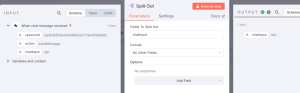
3 HTTP REQUEST: Batch retrieve relevant video subtitles
Configure the JSON format content in the request body:
{
    "dateFilter":"week",
    "downloadSubtitles":false,
    "hasCC":false,
    "hasLocation":false,
    "hasSubtitles":false,
    "is360":false,
    "is3D":false,
    "is4K":false,
    "isBought":false,
    "isHD":false,
    "isHDR":false,
    "isLive":false,
    "isVR180":false,
    "lengthFilter":"plus20",
    "maxResultStreams":0,
    "maxResults":10,
    "maxResultsShorts":10,
    "preferAutoGeneratedSubtitles":true,
    "saveSubsToKVS":true,
    "searchQueries":[
        {{ $json.chatInput.toJsonString() }}
    ],
    "sortingOrder":"views",
    "subtitlesLanguage":"any",
    "videoType":"video"
}
4 LOOP+HTTP REQUEST: Batch retrieve video subtitles
- Set the loop node to execute 1 item at a time, and the HTTP node retrieves subtitles for that batch of videos, looping until all video subtitles are extracted.
5 CODE: Data Cleaning
Use the code node to extract captions from all items and combine them into a complete caption text.
// Access all input items (each one is a video)
const items = $input.all();

// For each video item, join the captions from data[]
const result = items.map(item => {
  const data = item.json.data;
  // Safely join text only if data is an array
  const fullCaption = Array.isArray(data)
    ? data.map(d => d.text).join(' ')
    : '';
  return {
    json: {
      full_caption: fullCaption
    }
  };
});

return result;
6 AI AGENT: Content Rewriting
Through the Agent node, rewrite the caption text from the previous node into content and format suitable for blog website publishing. The prompt reference is as follows:
YouTube transcript: {{ $json.full_caption }}
---
### TASK:
Using the above content, write a **WordPress-friendly blog post** specifically for **non-technical visitors**.
Please follow these requirements:
- **Audience**: Beginner/intermediate AI learners with no technical background
- **Tone**: Clear, friendly, educational, and slightly conversational
- **Structure**:
  - Catchy title
  - Engaging introduction (use story, scenario, or question to pull in)
  - Key takeaways or main idea (from transcript and tweet)
  - Real-life marketing use case(s) with GenAI (but NO code, no technical setup)
  - Add a section for "What you can try next" to inspire action
  - Call-to-action (subscribe, comment, or listen to full episode)
- **DO NOT include** technical jargon, implementation steps, or anything related to code or API.
### OUTPUT FORMAT:
Output ONLY a valid JSON object with no markdown formatting, **no ```json``` wrapping**, and no explanation. Just pure JSON like this:
{
  "title": "Your Title",
  "content": "Full content in plain string with \n and escaped quotes"
}
7 CODE: Formatted Output
To ensure more stable adaptation for downstream nodes, we set the code node to output the title and content in a formatted way. The code reference is as follows:
const raw = $json.output;
let parsed;

try {
  parsed = JSON.parse(raw);
} catch (e) {
  const err = e instanceof Error ? e : new Error(String(e));
  throw new Error("❌ Failed to parse output JSON:\n\n" + raw + "\n\nReason: " + err.message);
}

return {
  json: {
    title: parsed.title,
    content: parsed.content
  }
};
8 MARKDOWN ➜ HTML
Process the content section into HTML format, which is more convenient for WordPress rendering.
9 HTTP REQUEST: WordPress Publishing
- Authentication: Select ‘generic credential type’ for authentication, OAuth2 API type. Go to the WordPress developer website yourself to obtain the relevant client ID and secret (if you are a WordPress upgrade user, you can directly use n8n’s predefined WordPress for authentication).
Finished Product Test
- Type “n8n” into the chat box.
- A few minutes later, 10 perfectly formatted new articles appear on WordPress.
A one-stop content factory, truly satisfying!
Final Thoughts
The above is the complete implementation of “batch automated blog publishing.” From content scraping and generation to distribution, the entire process is unattended, giving you back your creative time for more valuable areas.
If you also want to create similar automation for your blog, video account, or Newsletter, or have broader channel content scraping needs, please leave a message or send a private message. I will provide customized solutions based on your requirements to help you efficiently aggregate and distribute content!
I am Yutou Xiaobao. Follow me to continue exploring the growing universe of GenAI.
If you found this article helpful, don’t forget to like + collect + share it!
Related articles:
N8N Full Workflow Tutorial | One-Click from YouTube Video to WeChat Official Account Copy!
https://mp.weixin.qq.com/s?_biz=MzI1MjkyNjI4NQ==&mid=2247484164&idx=1&sn=041d6a87840daebcd5b69cf5a5ae9056&scene=21#wechatredirect
N8N Advanced Tutorial | How to Automatically Push AI News Daily to Enterprise Feishu Groups?
https://mp.weixin.qq.com/s?_biz=MzI1MjkyNjI4NQ==&mid=2247484038&idx=1&sn=68f04acee33fb636e4dbbfd561ba3d73&scene=21#wechatredirect
Say Goodbye to Information Anxiety! Hand-in-Hand Guide to Building Your Exclusive AI News Daily with N8N for Efficient Global Hotspot Access
https://mp.weixin.qq.com/s?_biz=MzI1MjkyNjI4NQ==&mid=2247483965&idx=1&sn=5c60e27031f8eeb88e153c0fe608e45a&scene=21#wechatredirect
 AI洞察
AI洞察 
Leave a comment